Everyone has an opinion about whether vibe-coded apps are "safe" or "ready." We wanted numbers instead.
So in October 2026 we took 76 apps that their makers had already launched and listed publicly, mostly apps built with Lovable plus a few others, and ran each homepage through the same free Throttle Bird scan anyone can run. One scan per app, nothing more.
We're not naming any app, and we never will. Everything below is totals and percentages. If you built one of these apps, nobody can tell from this post, and that's on purpose.
The short version
- 74% of apps got an A or B. Only 4% got an A.
- 97% were missing basic browser safety settings (called "security headers").
- 67% had at least one problem that makes it harder for Google to find them.
- The scary stuff was rare. We found no apps whose database answered a stranger, and no private keys sitting in the page's code.
- The typical app had 2 things to fix. Most take one prompt to your builder tool.
How the grades landed
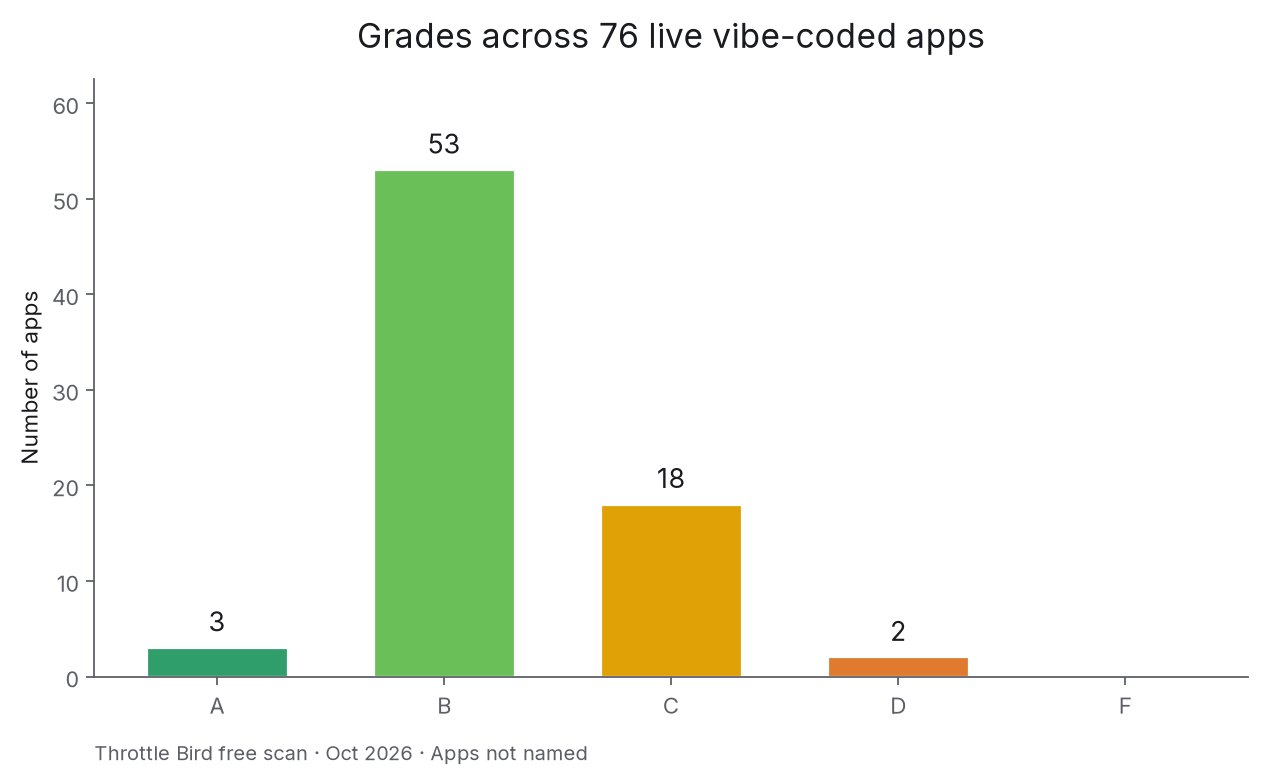
Most apps landed in the B range: 3 A's, 53 B's, 18 C's, 2 D's and 0 F's. That's better than the "vibe coding is a security disaster" headlines suggest. It's also not great: a B usually means a few easy fixes are still waiting, and 26% of apps scored a C or lower.
The most common problems
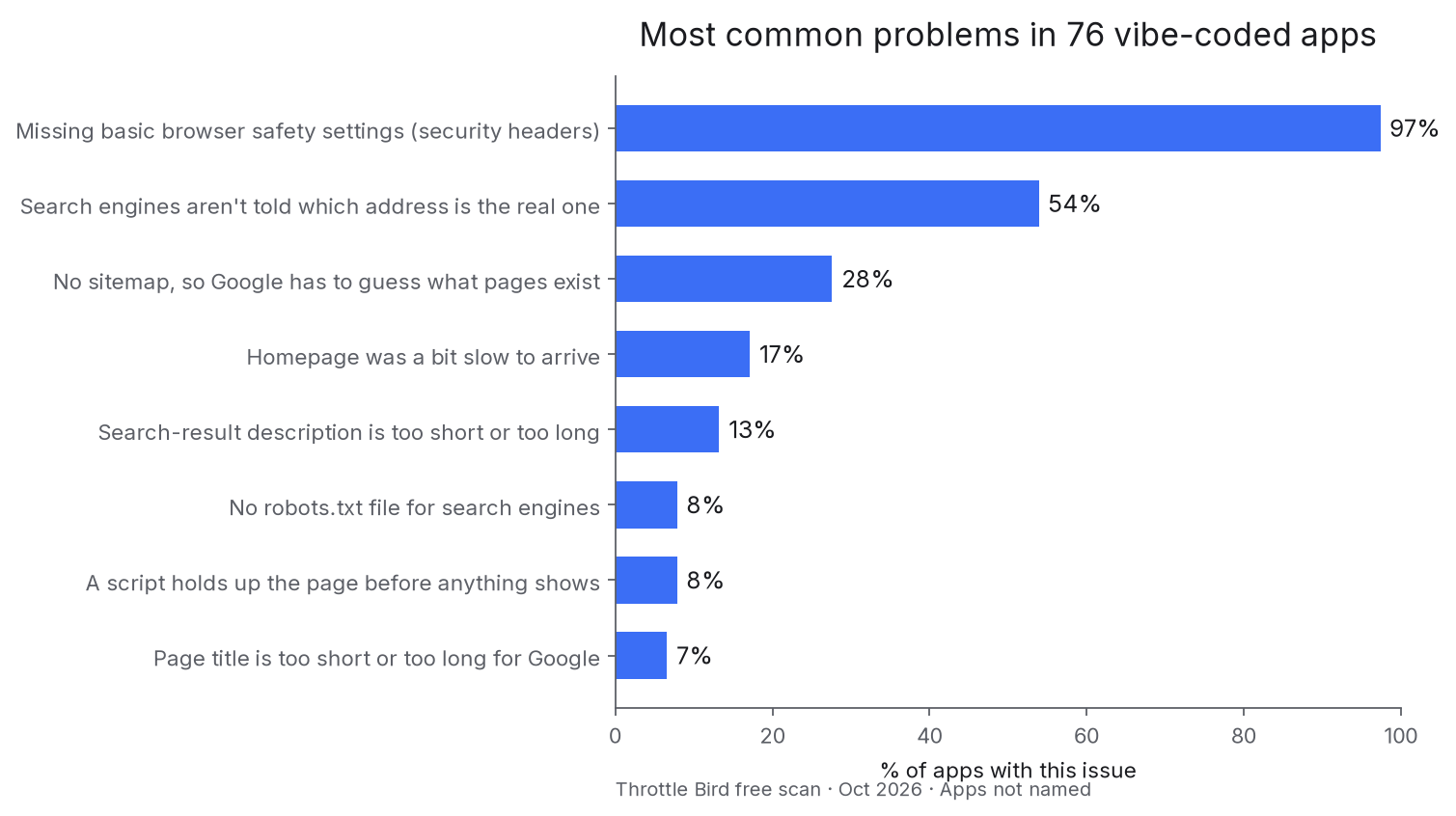
1. Missing browser safety settings (97% of apps)
Security headers are short instructions your site sends to the browser, like "don't let other sites put me in a frame" or "only load scripts from places I trust." They're invisible to visitors, but they block whole kinds of attacks. Builder tools almost never add them for you, which is why nearly every app was missing them.
Paste this into your builder tool:
Add standard security headers to every page of my site: Content-Security-Policy (start with a policy that allows my current scripts, fonts and images), Strict-Transport-Security, X-Content-Type-Options: nosniff, Referrer-Policy: strict-origin-when-cross-origin, and a frame-ancestors rule so other sites can't put my pages in a frame. Use my hosting platform's headers config. Then tell me in plain English what each one does and check nothing on the site broke.2. Google isn't told which address is the real one (54% of apps)
If your app answers at both www. and the plain address, or with and without a trailing slash, Google may treat them as different pages and split your ranking between them. A "canonical" tag tells Google which one counts.
Add a canonical link tag to every page that points to that page's main https address on my real domain (not a preview or .app address). Make sure each page's canonical is its own address, not always the homepage.3. No sitemap (28% of apps)
A sitemap is a list of your pages that Google reads. Without one, Google has to find pages by following links, and new pages can take weeks to show up.
Create a sitemap.xml at the root of my site listing every public page with its full https address, and a robots.txt that points to it. Leave out login, dashboard and account pages.4. A slow or heavy first load (22% of apps)
22% of homepages took noticeably long to arrive, or were heavy. On a phone with weak signal, that's when people give up and leave.
My homepage is slow to load. Find what's making the first load heavy or slow (large images, big scripts, fonts, anything loaded before the page shows) and fix the biggest causes. Don't remove features. Tell me before and after sizes.The good news: the scary stuff was rare
Here's what surprised us. The free scan also checks whether your database answers strangers who aren't logged in, and whether private keys are visible in your page's code. In this sample, neither showed up even once. 58% of the apps use Supabase from the browser. That's normal and fine when it's locked down, and on the checks the free scan runs, none of them let a stranger read data.
Only 5% of apps had a serious problem other than the missing safety settings above.
A fair warning: the free scan only looks at your homepage and what it loads. It can't log in, so it doesn't see what happens behind your sign-in page, and "we didn't find it" isn't the same as "it isn't there." If your app stores anything private, it's worth testing it like a stranger would: open it in a private window while signed out and see what loads. Our plain-English guide to locking down Supabase walks through it.
What this means if you're about to launch
The apps in this study weren't broken. Most were one or two prompts away from an A. The problems that showed up most are the boring, invisible ones that builder tools skip and nobody notices, until Google ignores your site or a link preview looks blank.
That's the whole reason we built a pre-launch checklist: five minutes of boring checks before you post your launch.
How we did this
- Which apps: 76 apps whose makers had already listed them publicly with a live link, mostly from community showcase pages for vibe-coded apps. We left out a few that were offline or wouldn't load.
- What we ran: one free Throttle Bird scan per homepage. It's the same request any visitor can make from our homepage, at the same speed limit. No logins, no guessing at hidden pages, no extra probing.
- What we kept: only the grade and the type of each problem. We didn't save any keys, data or other details from the apps.
- What we publish: totals and percentages only. No names, links or screenshots of any app.
- Limits: the scan checks the homepage and the scripts it loads, not every page. It's a snapshot from one day in October 2026. Apps change all the time.
Want to see how your own app compares? Throttle Bird has a free scan, with paid reports for deeper fixes.